Send Thoughtful Messages on Autopilot for Busy Couples

Send Thoughtful Messages on Autopilot for Busy Couples
Automated thoughtful messaging is the practice of scheduling personalized, emotionally meaningful notes to reach the right person at the right moment, without requiring you to remember or write them in real time. Over 500,000 professionals already use AI-powered tools to automate messaging workflows, and the same approach works just as well for romantic relationships. When life fills up with work, errands, and obligations, the gestures that keep a relationship strong are often the first to slip. Sending thoughtful messages on autopilot solves that problem by building consistency into your communication without adding another task to your day.
What tools do you need to send thoughtful messages on autopilot?
The right setup requires three things: a tool that generates personalized message content, a way to schedule delivery, and a clear picture of who you are messaging and why. Without all three, automation produces generic output that feels hollow rather than heartfelt.
AI message generators
AI message generators are the engine of the whole system. Modern AI generators produce personalized greetings in under 5 seconds, which means you can draft a week’s worth of messages in the time it takes to make coffee. The best platforms offer multiple output formats. Some tools produce plain text, while others generate photo cards or even short speaking avatar videos, giving you options that match the occasion and the channel.

The key input is specificity. A generator that receives “anniversary message for my partner” produces something forgettable. A generator that receives your partner’s name, the year you met, a shared memory, and the tone you want produces something that sounds like you wrote it yourself. Platforms that use pre-filled templates and guided prompts make this easy, even for people who dislike writing.
What to prepare before you start
Gather this information before you open any tool:
- Recipient details: name, relationship, and communication preferences (SMS, email, or a messaging app)
- Key dates: birthdays, anniversaries, job milestones, and recurring check-in moments
- Personal context: a recent shared experience, an inside joke, or a challenge your partner is currently facing
- Tone preferences: casual and warm, playful and funny, or sincere and direct
- Delivery channel: confirm which platform your partner checks most reliably
Pro Tip: Keep a running note on your phone where you jot down small moments, things your partner said, or events coming up. Feed those details into your AI tool and the output will sound nothing like a template.
| Feature category | What to look for |
|---|---|
| AI content generation | Produces multiple tone options and message variants |
| Scheduling capability | Allows date-specific or recurring delivery |
| Personalization options | Accepts custom inputs beyond name and occasion |
| Channel flexibility | Supports SMS, email, or in-app delivery |
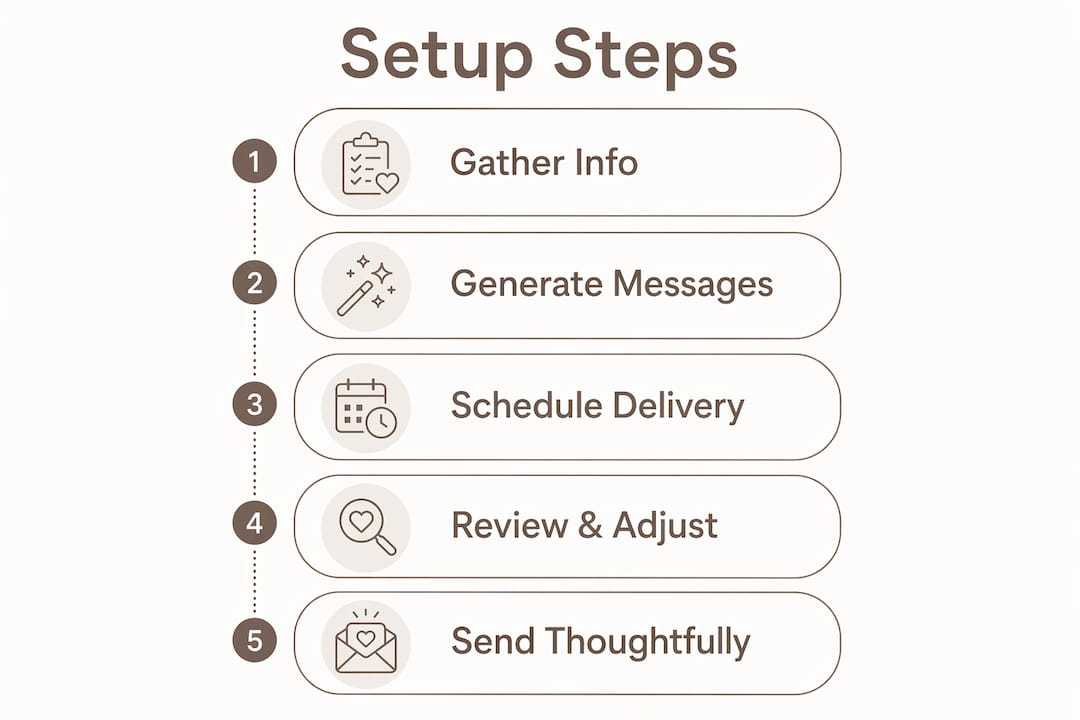
How to set up automated thoughtful messages step by step
A clear process prevents the two most common failures: messages that sound generic and messages that arrive at the wrong moment. Follow these steps to build a system that works.
-
Choose a reliable AI message tool. Select a platform that lets you control tone and accepts personal details as inputs. Tools that offer multiple tone options, such as casual, sincere, or playful, give you the most flexibility across different occasions.
-
Build your contact context file. For each person you plan to message, write down their name, your relationship history, upcoming dates, and one or two personal details that only you would know. This file becomes the raw material for every message you generate.
-
Define the tone for each occasion. A birthday message calls for warmth and celebration. A Tuesday morning check-in calls for something light and brief. Matching tone to context is what separates a thoughtful note from a scheduled notification.
-
Generate and customize your messages. Run your inputs through the tool and review the output. AI writing partners help you express genuine feelings faster, but they are not a replacement for your own judgment. Edit any phrase that does not sound like you.
-
Schedule delivery on meaningful dates. Set messages to arrive on birthdays, anniversaries, the morning before a big presentation, or any moment that matters to your partner. Timing is as important as content.
-
Test before you send. Send a test message to yourself first. Read it aloud. If it sounds stiff or impersonal, revise the inputs and regenerate.
-
Review responses and adjust. When your partner responds warmly to a specific type of message, note what worked. When a message lands flat, identify what felt off and change your inputs for next time.
Pro Tip: Schedule one unplanned message per month with no occasion attached. A note that says “I was just thinking about you” on a random Wednesday carries more emotional weight than a perfectly timed birthday greeting.
Relationships often fade not from a single failure but from a slow drift of missed small gestures. Automation fills that gap by making consistency the default rather than the exception.
What are common mistakes in automated thoughtful messaging?
Automation fails when it replaces thought rather than supporting it. The most common mistake is sending the same message structure repeatedly. Your partner will notice the pattern, and the messages will start to feel like calendar reminders rather than genuine connection.
Avoid these pitfalls:
- Skipping personal details. Including one unique personal detail in each message, such as a specific shared memory or a challenge your partner mentioned recently, is what makes automated messages sound authentic. Without it, the message reads as a template.
- Over-scheduling check-ins. Limit automated messages to 2 to 3 per week at most. More than that tips from thoughtful into intrusive, and the emotional value of each message drops.
- Mismatching tone to moment. A celebratory message sent during a difficult period feels tone-deaf. Use a gentle, inquisitive tone when your partner is going through something hard, and save the upbeat energy for good news.
- Relying on repeating schedules. A message that arrives every Monday at 9:00 AM stops feeling spontaneous within two weeks. Use silent scheduling for one-off, event-triggered messages instead of recurring automated sequences.
- Ignoring life changes. If your partner changes jobs, moves, or goes through a major life event, update your message context file immediately. An outdated message reference can feel careless rather than caring.
Pro Tip: Before scheduling a batch of messages, read them all in sequence as if you were the recipient. If they start to sound similar, vary the structure, the opening line, or the specific detail you reference.
The greatest hurdle in thoughtful communication is simply starting. AI removes the blank page problem, but you still need to bring the intention.
How do you measure and improve your automated messages over time?
Effectiveness in automated messaging is not measured by delivery rates. It is measured by how your partner responds, both in words and in the quality of your connection over time.
Start by tracking responses informally. When a message generates a warm reply, a phone call, or a “that made my day” reaction, note what you did differently. When a message gets no response, consider whether the timing, tone, or content missed the mark.
“Automation moves relationships from transactional to relational by sending consistent, meaningful small moments. The goal is not efficiency for its own sake. It is presence, even when you are not physically present.”
Use that feedback to refine your inputs. If your partner responds best to humor, lean into playful tone options. If they value sincerity, keep the messages direct and specific. Thoughtful digital communication works best when it evolves with the relationship rather than staying fixed at the setup stage.
Build in a monthly review. Spend ten minutes updating your contact context file with new details, removing outdated references, and adjusting the frequency of scheduled messages based on what has been working. This review is what keeps automated messaging feeling alive rather than mechanical.
The balance between automated and spontaneous communication matters. Automation handles the consistent baseline. Spontaneous messages, the ones you send because something reminded you of your partner, add the unpredictability that keeps a relationship feeling dynamic. Use both, and let each do what it does best.
Key takeaways
Automated thoughtful messaging works when it combines AI-generated personalization, specific personal details, and tone-matched scheduling to create consistent emotional connection without sounding robotic.
| Point | Details |
|---|---|
| Specificity drives authenticity | Include one unique personal detail per message to avoid generic output. |
| Limit frequency | Cap automated messages at 2 to 3 per week to preserve emotional value. |
| Match tone to moment | Use celebratory tone for good news and a gentle tone for difficult times. |
| Use silent scheduling | Schedule one-off, event-triggered messages instead of repeating sequences. |
| Review and refine monthly | Update your contact context file and adjust based on how your partner responds. |
Why I think most people automate messaging the wrong way
The standard advice is to set it and forget it. Pick your dates, generate your messages, and let the system run. I disagree with that approach, and I have seen it backfire more than once.
Automation works best as a first draft, not a finished product. The tools are genuinely good at getting words on the page. What they cannot do is notice that your partner had a rough week, that you two just had a difficult conversation, or that a message you scheduled three months ago now references something that no longer applies. That awareness is yours to bring.
The couples I have seen get the most out of personalized love tools treat the AI as a writing partner, not a ghostwriter. They generate three options, pick the one that sounds most like them, edit two sentences, and send. The process takes four minutes. The result feels like it took much longer.
The other thing worth saying: do not automate everything. Keep some messages completely unplanned. The ones that arrive because you were thinking about your partner in the middle of a Tuesday carry a weight that no scheduled message can replicate. Automation builds the floor. Spontaneity builds the ceiling.
— Alan
Pingher makes it easy to stay emotionally present
Staying connected when life gets busy is not about finding more time. It is about using the time you have more intentionally.
Pingher is built for exactly that. With one-tap message sending and AI-powered personalization, Pingher helps you send affection messages between meetings, before bed, or whenever a moment calls for it. The platform preserves your authentic voice while handling the scheduling and delivery, so your partner feels valued consistently, not just on the days you remember to reach out. Visit Pingher to see how it works for couples who want to stay close without adding complexity to their day.
FAQ
What does it mean to send thoughtful messages on autopilot?
Sending thoughtful messages on autopilot means using AI tools and scheduling features to deliver personalized, emotionally meaningful notes at the right moment without writing them in real time. The goal is consistent connection, not convenience for its own sake.
How many automated messages should I send per week?
Limit automated check-ins to 2 to 3 per week to maintain emotional value without overwhelming your partner. Sending more than that reduces the impact of each individual message.
How do I keep automated messages from sounding robotic?
Including one unique personal detail in each message, such as a shared memory or a current challenge your partner is facing, is the most effective way to keep automated messages sounding genuine rather than templated.
What is silent scheduling in message automation?
Silent scheduling means setting a one-time, event-triggered message for a specific date rather than using a repeating automated sequence. It preserves the feeling of spontaneity because the message does not arrive on a predictable pattern.
Can I automate thoughtful messages for my partner specifically?
Yes. Platforms like Pingher are designed for couples and let you craft personalized messages with tone controls and scheduling built in, so your partner receives something that feels personal, not automated.
Recommended
Built for couples who care.
Pingher helps you send the right words at the right moment.
Get Pingher on Google Play