Remember Important Dates: Build a Three Reminder System in 30 Minutes
Remember Important Dates: Build a Three Reminder System in 30 Minutes
Use an automatic reminder system and add dates the moment you learn them. That combination is the most reliable way to never miss a birthday, anniversary, or renewal again. This is really about showing up intentionally for the people who matter, and tools like Pingher make the habit effortless once you build it.
TL;DR:
- Reminders should include an advance notice of 7 to 30 days for birthdays and anniversaries, 30 days for renewals, and 60 to 90 days for tax deadlines.
- Gathering date information from multiple sources takes less than 30 minutes and should be followed by setting three layered reminders per event.
- Use memory techniques like chunking, spatial visualization, and spaced repetition for historical dates or names, which don’t require app-based alerts.
- Reminder apps that combine notifications with prewritten messages or gift suggestions can deepen the impact of your timely gestures.
- Starting with just five key dates and automating reminders increases consistency and builds a reliable system that strengthens personal relationships over time.
Table of Contents
- How Do You Set Up a System to Remember Important Dates?
- Which Dates Should You Add to Your List Right Now?
- Build Your Master List and Automate It in Under 30 Minutes
- Simple Memory Tricks for Historical Dates and Names
- Which Tools Actually Fit How You Pay Attention?
- Why This System Actually Protects Relationships
- Why Remembering Dates Matters More Than Doing It Perfectly
- Let an app handle the reminders so you can handle the moment.
- Sources
How Do You Set Up a System to Remember Important Dates?
The strongest systems use two or three layers of reminders instead of one lonely alert. Relying on a single notification is how anniversaries slip through, because life gets loud and one ping gets swiped away without a second thought.
Here’s the layered approach worth copying:
- Advance reminder — gives you time to plan a gift, book a table, or write something thoughtful. Recommended lead time is 7 to 30 days depending on the task.
- Day-before reminder — a check that everything is ready, so nothing gets rushed the morning of.
- Day-of reminder — the final nudge that gets the message sent or the call made.
Lead time isn’t just logistics. It’s what turns a rushed text into a gesture that actually lands, because experts note that the point of offloading these reminders is to show up intentionally, not to fire off an apology at 11:58 PM.
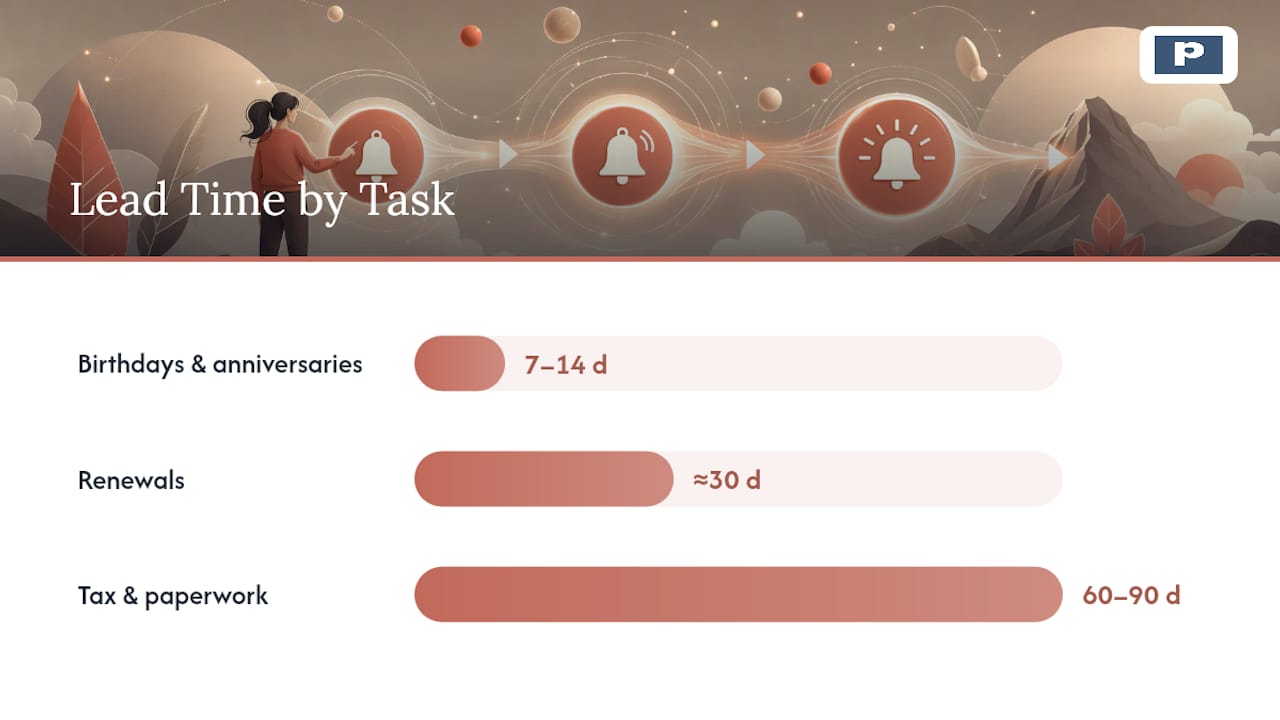
Match the lead time to the task. Birthdays and anniversaries do fine with 7 to 14 days of notice. Renewals, like a car registration or a lease, need closer to 30 days. Tax deadlines and anything involving paperwork deserve 60 to 90 days, because those tend to snowball if you start late.
Which Dates Should You Add to Your List Right Now?
Overwhelmed by how many dates actually matter? Start with this priority order and add them today, not “eventually.”
- Partner milestones — anniversaries, first-date anniversaries, engagement dates. Set reminders 7 to 14 days out.
- Immediate family and close friends — birthdays, parents’ anniversaries. Same 7 to 14 day window.
- Vehicle and licenses — registration, insurance renewal, driver’s license expiration. Give yourself 30 days.
- Subscriptions and leases — anything that auto-renews or requires notice to cancel. 30 days minimum.
- Health dates — annual checkups, prescription refills, dental cleanings. 14 to 30 days.
- Financial and tax dates — filing deadlines, quarterly payments. 60 to 90 days, since these carry real penalties.
Six categories, one list. That’s the whole master plan.
Build Your Master List and Automate It in Under 30 Minutes
This isn’t a weekend project. Block 20 to 30 minutes, and you’ll walk away with a system that runs itself.
- Gather your sources. Pull dates from your phone contacts, old birthday cards, email confirmations, insurance documents, and your wallet. Most people are tracking more than 40 recurring dates a year without realizing it, scattered across five different places.
- Pick one delivery channel. Push notifications work if you check your phone constantly. Email or text works better if you tend to swipe past app alerts. Pick whichever one you actually respond to, not the one that sounds more organized.
- Set your three reminders per date, using appropriate lead times. If a date falls on a weekend, push your advance reminder back a couple of extra days so you’re not stuck planning on a Sunday with nothing open.
- Test one date, then add redundancy. Set a reminder for tomorrow, confirm it actually fires, then layer a second channel (push plus email, or push plus a text) for anything non-negotiable, like an anniversary.
The habit that makes this stick is what you might call the “set it immediately” rule. The moment someone mentions their birthday, or you get a renewal notice in the mail, enter it right then. Waiting until you’re “doing your calendar later” is exactly how these dates get lost in the first place.
Pro Tip: Keep the “add a date” step to one action, no more. A note-taking app, one shared list, or a single app that captures the date and schedules the reminder in the same tap. Every extra step is a chance to put it off.
Simple Memory Tricks for Historical Dates and Names
Not every date belongs in an app. If you’re studying history or just want to keep facts sharp in conversation, memory techniques beat any notification.
- Chunk the numbers. Break 1492 into “14” and “92,” then attach a vivid, slightly absurd image to each half. Your brain holds pictures far better than digits.
- Use a mental location. Picture a place you know well, then “place” each historical event along a path through it. This is the loci method, and it works because spatial memory is far stickier than rote repetition.
- Space out your review. Revisit the date after 1 day, then 3 days, then 7 days, then 30 days. Spaced repetition is one of the most reliable ways to move facts into long-term memory, and it takes minutes each round.
Which Tools Actually Fit How You Pay Attention?
Not every tool suits every brain, and picking the wrong one is why so many reminder systems get abandoned by March.
- Calendar apps are great for visibility. Everything’s in one place, but they’re easy to skim past if you don’t also set alerts.
- Reminder apps push harder, which is good for action items but can get noisy fast if you dump everything into one list.
- SMS reminder services cut through when your phone is buried in app notifications, since a text tends to get read.
- Relationship-first apps like Pingher go a step further. They don’t just remind you a date is coming. They help you turn that reminder into a message already halfway written.
For shared households, a shared calendar works best for events everyone needs visibility on. Shared reminder lists work better for task-based dates, like “renew the lease,” where one person needs to act, not just know.
If you want a planner-style approach instead of an app, a structured planner method or a dedicated bill-tracking setup can cover the same ground on paper.
Why This System Actually Protects Relationships
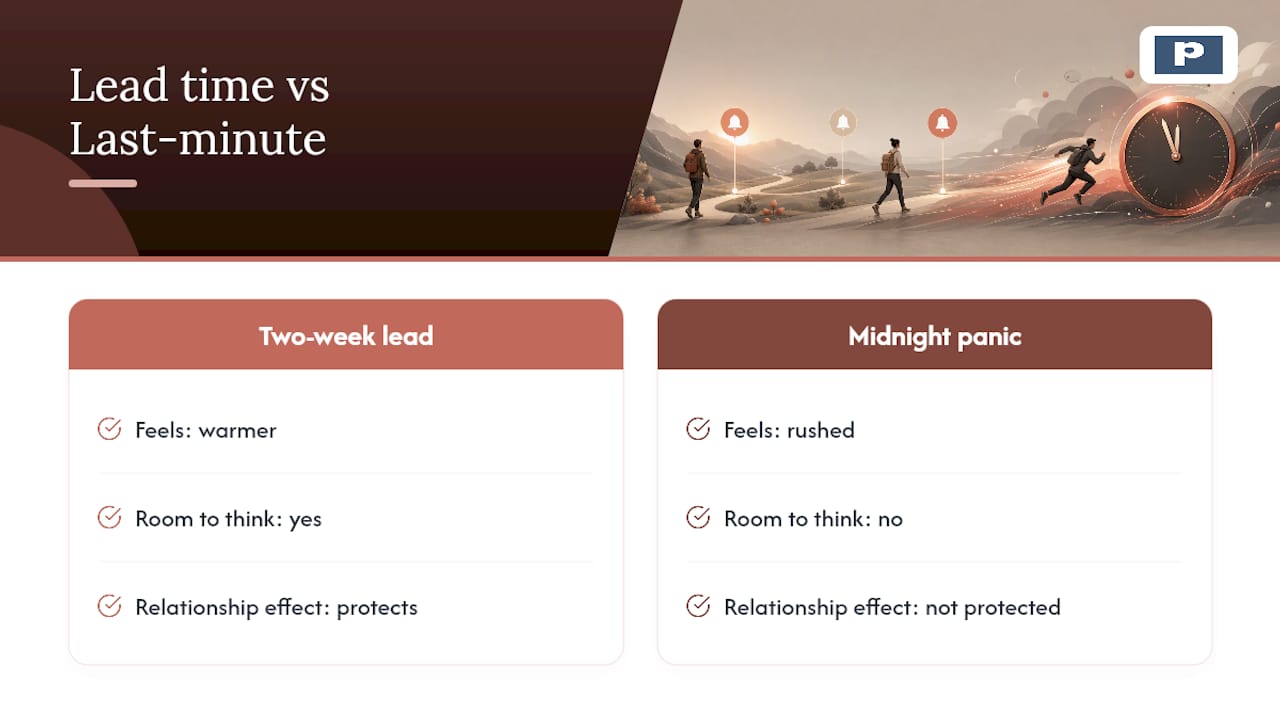
Reminder systems fail without lead time, and lead time is what turns a text into something that feels considered rather than rushed. A birthday message sent with two weeks of notice tends to be warmer than one typed in a panic at midnight, simply because there was room to think about it. That gap is the whole point.
Why Remembering Dates Matters More Than Doing It Perfectly
You don’t need a flawless system on day one. You need a small, consistent one. A slightly late “thinking of you” text still counts for more than nothing, and using a reminder at all is already an act of care.
Start with five dates. Add more as you go. The system gets stronger every time you use it.
— Alan
Let an app handle the reminders so you can handle the moment.
Some apps serve as an alternative to juggling five different apps for the same job: they build your master list, fire the advance, day-before, and day-of reminders you just read about, and hand you a message that’s already written when the moment arrives.
Where a plain calendar app tells you a date is coming, some apps turn that alert into something ready to send: a beautifully written note, a curated gift idea, or a getaway suggestion, delivered with one tap. That’s the whole system from this article, minus the setup work. You can read more about how scheduled reminders support daily connection, or see how easy it is to turn a reminder into a thoughtful message on autopilot.
If you’re the one who’s supposed to remember, but life keeps getting in the way, get Pingher on Google Play and load your first five dates tonight.
Sources
- How to Remember Important Dates | YouGot Guide
- Calm — How do I offload my mental load?
- How to Memorize Important Dates & Names Quickly & Permanently — Magnetic Memory Method
Recommended
Built for couples who care.
Pingher helps you send the right words at the right moment.
Get Pingher on Google Play